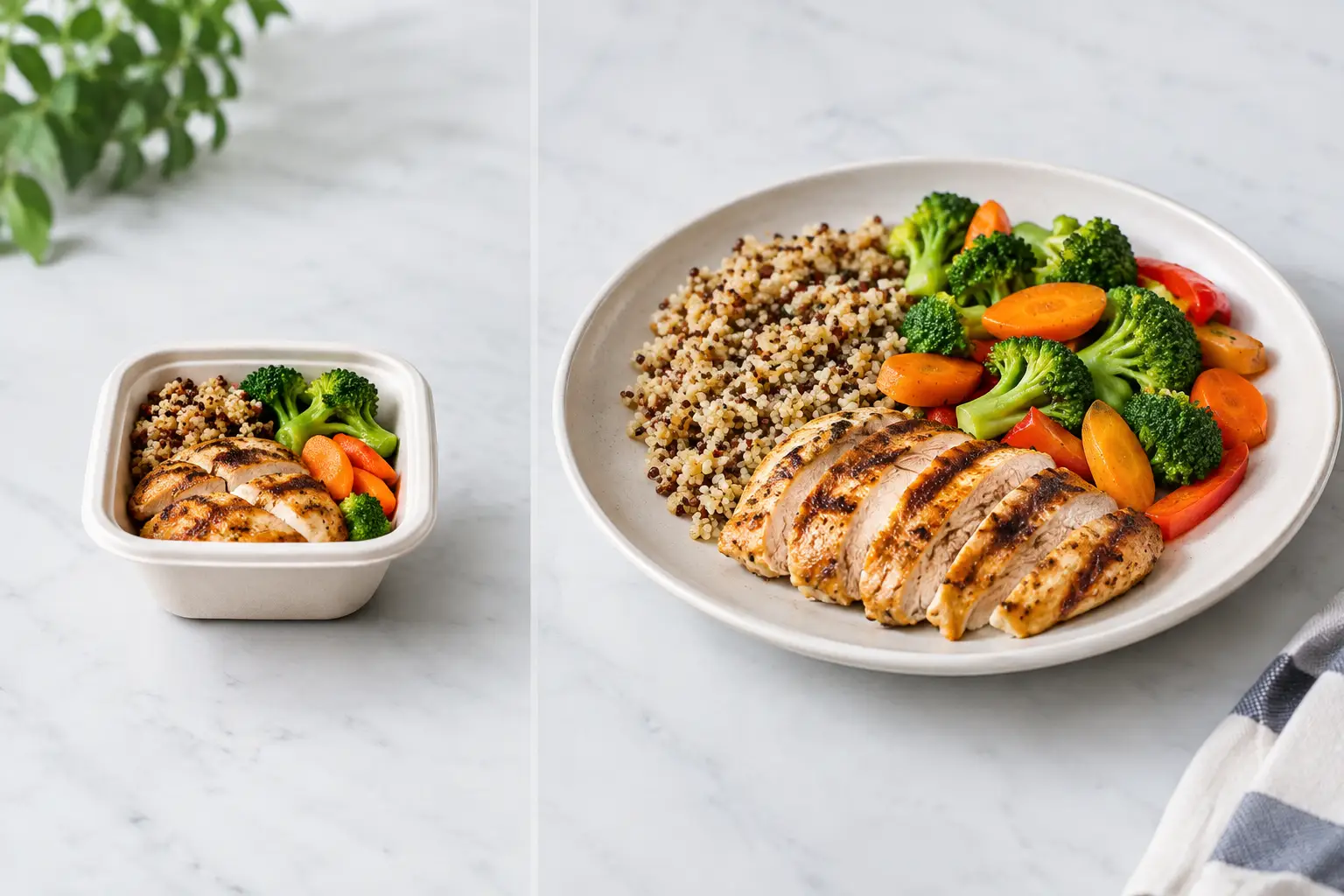
A tiny square photo can decide whether you spend $18 on lunch or close the app and order somewhere else. Yet delivery thumbnails versus full plates are often treated as the same thing: a quick visual cue that supposedly tells you what to expect. They do not. One is designed to catch your eye in a crowded screen. The other can help you judge a meal before your money, appetite, and expectations are on the line.
For diners who are tired of guessing, that difference matters. It matters when a menu description is vague, when a restaurant uses an old promotional image, when dietary needs make surprises stressful, and when decision fatigue turns choosing dinner into work.
Delivery Thumbnails Versus Full Plates: The Real Difference
A delivery thumbnail is a small image built for speed. It may be cropped tightly, color-corrected heavily, reused across several menu items, or pulled from a restaurant’s marketing library. Its job is usually to make browsing feel fast and appealing. There is nothing wrong with that goal, but it is a limited one.
A full-plate image shows more of the reality a diner is trying to evaluate. You can see portion size in relation to the plate or container, the balance of ingredients, the sauce level, sides, toppings, texture, and sometimes even the packaging that will arrive at your door. It gives context that a thumbnail often leaves out.
Consider a bowl described as “spicy chicken rice bowl.” A thumbnail may show glossy chicken and a bright garnish, but not reveal that the bowl is mostly rice, the chicken is breaded rather than grilled, or the sauce coats everything. A fuller, authentic photo gives a person more information to decide whether that is a great fit or an easy pass.
The point is not that every food photo must be a studio production. In fact, overly polished imagery can create a different kind of disappointment. What people need is an honest visual reference that matches the dish being sold.
Why Small Images Create Big Ordering Gaps
Food ordering is already full of guesswork. Menu names vary by restaurant. Descriptions can be brief, playful, or incomplete. Terms such as “loaded,” “classic,” “house style,” and “fully dressed” mean very different things depending on the kitchen.
Thumbnails can add to that uncertainty because they compress visual detail right when detail is most useful. On a phone screen, it can be hard to tell whether a sandwich comes with a side, whether a salad includes protein, whether a burrito is smothered in cheese, or whether the pictured item is actually a larger family-size portion.
This is not just about getting a prettier meal. A disappointing order can mean wasted money, a missed lunch break, or having to place a second order when the first one does not work. For people managing food sensitivities, texture preferences, or limited energy for decisions, unclear visuals raise the stakes.
There is also a trust issue. When the delivered meal looks nothing like the listing image, diners often feel misled even if the restaurant technically used a representative photo. Accuracy builds confidence. Repeated mismatch teaches people to expect less from digital menus.
Full Plates Help Diners Make Personal Decisions
A complete plate photo will not answer every question, and it should not replace clear ingredient and allergen information. But it can answer questions that text struggles to handle.
Visual context helps people estimate how a meal is assembled. Is the lettuce inside the wrap or served on the side? Are the fries thin and crisp-looking or thick-cut and seasoned? Is the pasta creamy, tomato-based, or lightly dressed? Does the entrée appear substantial enough for one person? These are personal preference questions, and they are valid ones.
That is especially useful for diners with decision fatigue. When every menu item requires mental translation, the act of ordering can feel draining. Seeing a real dish can reduce the number of unknowns and make a choice feel more manageable.
For diners with visual impairments, images alone are not a complete accessibility solution. A photo without meaningful descriptions may be inaccessible or unhelpful. The better standard is visual transparency paired with accessible design: useful image descriptions, readable labels, support for screen readers, and photos that are clear rather than cluttered. Inclusion means giving people more than one way to understand what they are ordering.
Authentic Photos Beat Perfect Photos
There is a natural temptation to favor the most styled, dramatic food image. It may earn attention, but attention is not the same as confidence. A photo can look amazing and still fail the diner if it represents an idealized version of the meal rather than the item currently being prepared.
Authentic photos can show the dish in ordinary conditions: its actual serving vessel, a realistic amount of toppings, and the way components are arranged for takeout. They may not have restaurant-studio lighting, but they can be far more useful.
That does not mean any blurry snapshot should become a menu reference. Quality still matters. The most helpful community photos are well lit, in focus, and clearly tied to the correct menu item. They show enough of the plate or container to offer context without hiding the food under filters, hands, or distracting backgrounds.
There is a trade-off here. Restaurant photography is consistent and brand-controlled. Community-powered photography can be more current and representative, but it needs thoughtful review and clear labeling. The strongest visual menu experience makes room for both: polished images where they are accurate, and real customer photos where they add needed truth.
What to Look for Before You Order
When you are comparing food images, look beyond whether the dish appears delicious. Ask whether the photo gives you evidence.
Does it show the full entrée or only a close-up? Can you identify the main ingredients? Is the serving size easier to judge because there is a plate, bowl, utensil, or container in view? Does the image appear connected to the exact menu item, or could it be a general restaurant photo? And if a topping, side, or sauce matters to you, can you actually see it?
A single photo may still be misleading, especially if portions change or the restaurant modifies a recipe. Multiple recent photos are often more useful than one perfect image because they reveal what stays consistent. If every photo shows generous vegetables, for example, that is a stronger signal than a single tightly cropped picture.
It also helps to separate “I want this to look good” from “I need this to work for me.” Both needs count. The first is about appetite and enjoyment. The second may be about value, texture, portion, dietary comfort, or avoiding an order you know you will not eat.
A Better Standard for Digital Menus
Restaurants and delivery platforms have trained diners to browse food visually, but the visual standard has not always kept up with what people need. A thumbnail-first experience treats imagery as decoration. A full-plate, accessible experience treats it as decision support.
That shift is bigger than photography. It recognizes that a menu is not merely a sales tool. It is information people use to spend their money, meet their needs, and participate in everyday dining with more independence.
Pic-ture That!™ is built around that idea: real food photos can make restaurant discovery clearer, more inclusive, and more rewarding for the people who contribute them. Community images help turn isolated ordering experiences into a shared source of practical knowledge.
The next time a delivery thumbnail makes a dish look tempting, pause for one extra second. Look for the photo that shows the whole meal, not just its best angle. That little bit of clarity can be the difference between taking a chance and ordering with confidence.
Leave a Reply